




FAQs
Common questions for JINRAIKO products. Shipping, returns, and warranty details are on their own policy pages.
iPad Arm Mount with Magnetic Charging for Desk Setup & Creators
View productHow do I secure the base of the arm?
You have two easy options:
- Simply clamp the base to the edge of your desk.
- Use a desk cutout/hole to bolt the base from underneath.
What are the installation requirements?
- Grommet mount (through-desk): Desk thickness must be 10–60 mm (0.4–2.4 in).
- Clamp mount: Desk thickness must be 10–80 mm (0.4–3.1 in).
- VESA hole pattern: Supports both 75 × 75 mm (3 × 3 in) and 100 × 100 mm (3.94 × 3.94 in).
- Desk clearance: Allow at least 50 mm (2 in) of overhang beyond the desk edge for the clamp to grip properly.
How much power does the charging panel deliver?
The built-in charging panel provides18 Wof power.
Is the arm stable and safe? Will it fall?
Yes—it’s designed to support devices weighing up to6 kg (13.2 lb). Constructed from durable materials with a stable structural design, it holds tablets or iPads firmly in place, preventing wobble or accidental drops.
Does the arm use a pneumatic or mechanical mechanism?
It uses agas-spring(pneumatic)mechanism for smooth, adjustable positioning.
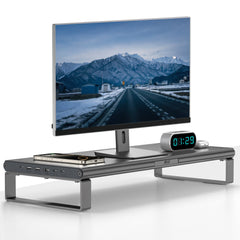
Monitor Riser with Wireless Charging for Desk Setup
View productCan I use all the ports at the same time?
To ensure stable power delivery when multiple ports are in use, we recommend pairing the hub with a charger rated 96 W or higher.
What ports and functions does it offer?
- Wireless Charging Pad
Qi‐compatible: charges smartphones, earbuds, smartwatches - USB-C Port #1
For charging phones, earbuds, watches or power banks - USB-A Ports (×2)
For peripherals such as printers, keyboards, mice - HDMI Output
Connects to an external monitor - USB-C Power-In Port
Accepts up to 100 W from an external charger - USB-C Upstream Port
Connect to your laptop (data + power) or an additional charger
What are the dimensions?
500 × 210 × 90 mm(approximately 19.7 × 8.3 × 3.5 inches)
How do I clean and maintain it?
- Unplug the unit from its power source.
- Wipe the stand and hub surfaces with a clean, damp cloth.
- This method safely and effectively removes dust and grime without harming the finish.
Overhead Camera Mount with Hydraulic Arm for Desk Setup & Filming
View productWhat cameras and phones are compatible with this camera arm?
It supports all UKA cameras. In addition, it comes with a phone holder that is compatible with all smartphone models.
How long is the warranty provided by JINRAIKO?
We offer a 30-day return and exchange policy, along with a 2-year free warranty.
Does the set include an extension pole?
Yes, the extension pole is included in the product package.
What is the maximum load capacity?
The maximum load is 0–6 kg (≈ 0–13.2 lbs).
What is the maximum shooting height of the device?
The maximum shooting height is 42 cm + 20 cm (with the extension rod installed), which equals approximately 16.5 in + 7.9 in.
Carbon Fiber MagSafe iPad Case with Contact Charging
View productWhat are the benefits of this product?
Scratch‑ and drop‑resistant protection for your iPad—while staying lightweight and easy to carry.
What materials is it made from?
Carbon‑fiber textured surface with a durable PC (polycarbonate) shell.
Is it compatible with the Magic Keyboard?
Yes—it’s fully compatible with Apple’s Magic Keyboard.
Where are the magnetic attachment points?
Magnets run along all four edges and across the back of the case, providing a secure grip wherever you attach.
Tablet Arm Mount for Desk – Adjustable Boom Arm Stand
View productHow do I install the magnetic plate?
Simply stick the magnetic plate on the back of your tablet (we recommend attaching it to the back of your protective case). Once in place, it’s ready to use instantly.
How long is the warranty provided by JINRAIKO?
JINRAIKO offers a 2-year warranty, giving you long-lasting protection and peace of mind with your purchase.
What does 0kg lift mean?
iPads and most tablets are much lighter than laptops. Ordinary boom arms are usually designed for heavier laptops, so when the weight is below that range, the arm tends to bounce back. With JINRAIKO’s 0kg lift design, it stays stable without rebound even with lightweight tablets.
How long will it take to receive my order?
We ship directly from the US. Most orders are delivered within 1–3 business days.
iPad Magnetic Charging Connector for Clean Desk Setup
View productWhat is the maximum charging power supported?
- Up to 35W for iPad Pro (M4) models
- Up to 18W for other compatible iPad models
Which iPad models support 35W charging?
- 13-inch iPad Pro (M4) — 35W Max
- 11-inch iPad Pro (M4) — 35W Max
What charger should I use for iPad Pro (M4)?
For iPad Pro models with the M4 chip, we recommend using a 35W or higher fast charger to achieve optimal charging performance.
What charger is recommended for other iPad models?
For non-M4 iPad models, a 20W or higher charger is recommended for stable and efficient charging.
iPad 10th Gen Magnetic Charger Q22 for Desk Setup
View productWhich iPad models is this charger compatible with?
This charger is only compatible with iPad 10th Generation (A16), including models A2696, A2757, A2777, A3162, A3354, and A3356.
It is not compatible with other iPad models or Android tablets. Please confirm your model before purchasing.
What is the maximum charging power?
The charger delivers up to 27W (9V/3A) of power, charging your iPad to about 40% in 1 hour.
It is designed to stay efficient while keeping surface temperatures below 37°C (99°F).
Is it safe to use and how reliable is it?
Yes. The charger is fully tested to meet international quality standards.
It provides a safer and more convenient alternative without the need for disassembly or costly repairs, and our support team responds within 24 hours if you need assistance.
iPad Gas-Spring Cooling Arm (Fan Included)
View productCan I use my own cooling fan?
Yes. Most iPad and phone gaming cooling fans are compatible. Please make sure the fan diameter is within 75 mm.
Does this JINRAIKO arm include a cooling fan?
Yes. A cooling fan is currently included as a free gift.
How does the iPad attach magnetically to the fan?
We provide a magnetic pad. Simply attach it to the back of your iPad, and you’re ready to use it.
Can I play FPS games on this arm?
Yes. The universal head design allows flexible movement, making it suitable for FPS gaming.
JINRAIKO Universal Desktop Stand for iPad & Phone
View productDoes it support both phone and iPad?
Yes. The upgraded foldable magnetic design supports both iPad and phones. When folded, it holds your phone securely without blocking the camera.
Is it stable? Will it tip over?
The base features a vacuum suction design for enhanced stability. For best performance, use it on a smooth, flat surface and avoid excessive movement during use.
Is it compatible with my device?
Yes. We include two magnetic kits. If your device doesn’t support MagSafe, simply use the included magnetic pads to enable a secure magnetic connection.
JINRAIKO Adjustable Drawing Display Stand
View productWhat is the maximum load capacity of the arm?
The arm supports 0–6 kg.
Is the arm included with the product?
The arm is NOT included.
What is the adjustable angle range of this stand?
The stand can be adjusted from approximately 25° to 85°.
Why are there so many screw holes?
The multiple screw holes are designed to fit pen displays of different sizes.
JINRAIKO Mobile Base for Cantilever Arms
View productWhich JINRAIKO arms does this base support?
It supports JINRAIKO laptop arms, camera arms, and iPad arms.
What is the maximum load capacity?
The maximum supported weight is 4.9 kg (10.8 lbs).
MagSafe Magnetic Adapter Sticker
View productWhy is the magnetic strength weaker than expected?
The magnetic sticker system includes two different sides: the magnetic receiver side and the magnetic attachment side. Please check the icon on each sticker before installation.
- The cube icon side is designed to attach to your phone or phone case.
- The phone icon side is designed to attach to MagSafe accessories, power banks, wallets, stands, and other devices.
For the strongest magnetic connection, please make sure the correct sticker is applied to the correct device and side.
Is this magnetic sticker only for phones?
No. This magnetic sticker is not limited to smartphones. It is designed to add MagSafe functionality to everyday objects, allowing many non-magnetic devices and accessories to become MagSafe-compatible.
You can use it on items such as power banks, wallets, tablets, laptops, car mounts, remote controls, and other flat surfaces. Transform your favorite accessories into magnetic-compatible devices and enjoy a more convenient MagSafe experience.
Will this magnetic sticker damage my phone?
No. The magnetic sticker is designed to be safe for your device. It uses high-quality 3M adhesive, which provides a strong and secure hold while allowing clean removal without leaving residue or damaging your phone surface when removed properly.
Can my phone still charge wirelessly after applying the magnetic sticker?
Yes. Your phone can still support wireless charging after applying the magnetic sticker, even with a phone case installed. However, charging compatibility depends on the type of magnetic charging accessory you use. Please make sure your wireless charger or MagSafe charging device is compatible with the sticker setup for the best charging experience.
JINRAIKO iPad Pro M4 Ultra-Slim Case, Compatible with Magic Keyboard
View productWhich iPad models is this case compatible with?
Compatible with:
- iPad Pro 11-inch (M4 & M5)
- iPad Pro 13-inch (M4 & M5)
Does this case work with the Magic Keyboard?
Yes. This case is designed for a perfect fit with the Apple Magic Keyboard. However, screen protectors—especially thicker ones—may affect the fit and prevent the iPad from closing or aligning perfectly. If your iPad has a thick screen protector installed, please consider this before purchasing.
Q21 Ultra Magnetic Contact Charger for iPad
View productDo I need a firmware upgrade before first use?
Yes — required. Install the JINRAIKO Q21 Ultra firmware upgrade before first use. Without this upgrade the charger may not work or may be unusable.
During the upgrade, keep the charger connected to power. There is no indicator light on the device. Follow the on-screen steps in the companion app (see the Upgrade section above for the guide).
Which iPad models is the Q21 Ultra compatible with?
35W Max: 13-inch iPad Pro (M4/M5); 11-inch iPad Pro (M4/M5).
18W Max: 13-inch iPad Air (M2/M3); 11-inch iPad Air (M2/M3); 12.9-inch iPad Pro (3rd / 4th / 5th / 6th Gen); 11-inch iPad Pro (1st / 2nd / 3rd / 4th Gen); 10.9-inch iPad Air (4th / 5th Gen).
It uses magnetic Smart Connector contact charging. Please confirm your model before purchasing.
What is the maximum charging power?
Up to 35W on 11-inch and 13-inch iPad Pro (M4 / M5), and up to 18W on the listed iPad Air and earlier iPad Pro models (see compatibility chart).
What power adapter should I use?
For iPad with M4 chip, use a fast charger of 35W or higher. For other compatible models, use a charger of 20W or higher.
How does magnetic Smart Connector charging work?
The Q21 Ultra snaps onto the Smart Connector contacts on the back of your iPad so you can charge without blocking the USB-C port — ideal for desk work, drawing, and travel.